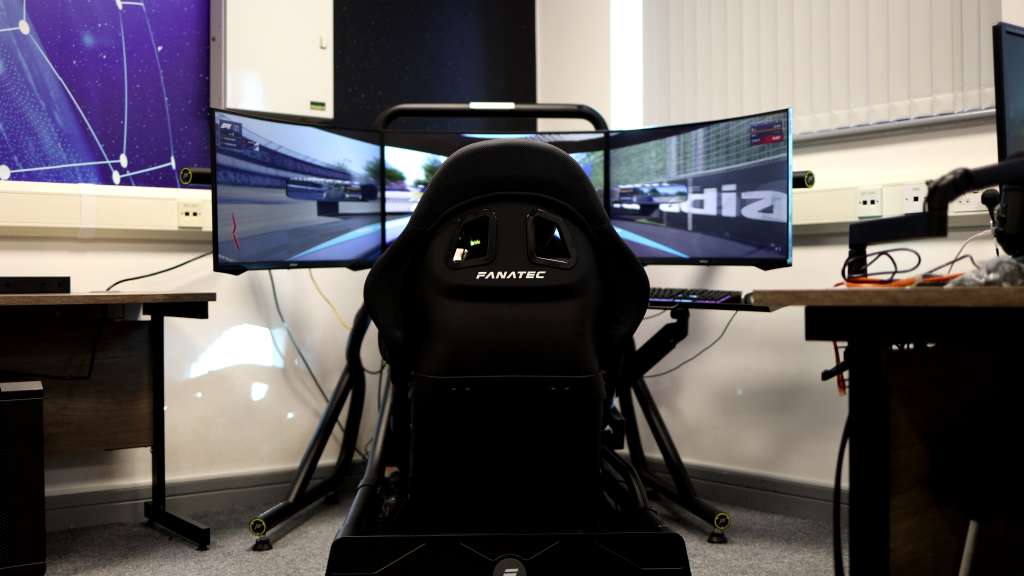
As the world of tech continues to spin faster and faster, some things become more compact, such as VR goggles, while others remain unchanged. Monitors are a case of the latter (if anything, they keep getting more and more curved), which is why we keep returning to this discussion: is a single ultra-wide monitor better than triples, or vice versa?

Photos by SimStaff
In this entry, we aim to help you on your way to making a decision and explore what might best fit your needs. Are you looking for total immersion, or are you building a pure, performance-focused rig designed to squeeze out every frame from your system? Or are you looking for a practical solution that fits your available space?
As a disclaimer before proceeding, it is important to recognise the temptation to jump straight into the “arms race” or tech-craze of constantly upgrading to the latest tech, simply because it appears “better.” There is no definitive “best” option, as individual practical needs can vary greatly. Your primary priorities should be your space budget, PC hardware limits, and, most importantly, what feels most comfortable to you. If possible, try to test different configurations before committing to what can be a significant investment.
Immersion and Field of View
Let’s return to the basics: the raison d’être of your monitor is to help you experience the virtual world. Its primary function should be to assist you in gauging distance, which is vital for braking accurately on the track and for developing an instinctive sense of how far objects near you actually are, such as a car in front that you may be following closely. You know that once their brake lights go on, you will need to make your inputs accordingly, and having a dependable gut feeling of how much time/distance you have to react in such a scenario is crucial.
As the many field-of-view calculators out there will tell you, based on your specific setup ergonomics, you will, ideally, need to run a much lower FOV than what might feel ‘natural’ for the sense of speed you’re used to in real life. For example, using a 21:9 format 34-inch ultrawide monitor placed 70 centimetres from your eyes would ideally require you to use a 29° FOV in games like Assetto Corsa and Assetto Corsa Competizione. A field of view like this can make the game world feel like it’s moving very slowly, which might confuse your sense of speed. Even so, it will help you better gauge when to brake in a corner or how far ahead the leading car from the aforementioned scenario actually is.

29° FOV in chase-scenario (car by Race Sim Studios)

70° FOV in chase-scenario
Using a 70° FOV might feel more natural, but it will make it harder to accurately pinpoint distances. While you might be able to see your side mirrors and more of the windshield, you will have a harder time gauging how far ahead the leading car is, as well as where your brake points are.
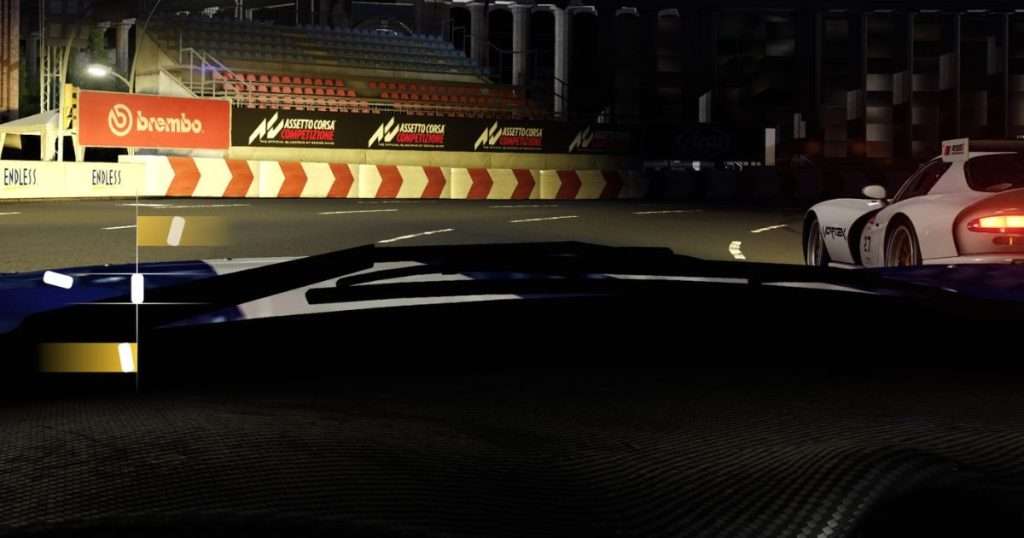
Radar by CMRT
Using a single monitor decreases the FOV of the game world, as seen in the 29° FOV example, making a radar crucial for knowing what is going on around you. This makes single-monitor driving easier by illustrating the actual distance to other cars around you. On a triple-monitor setup, you can more naturally ascertain this information thanks to the surrounding monitors, which make your side windows visible. A common, though understandable, mistake seen here among beginners is trying to achieve this same experience by fitting what amounts to a three-monitor field of view onto a single monitor. While this can improve spatial awareness by offering a broader overview, it distorts the perceived scale of the entire game world.
Although more costly and requiring more space, triple-monitor setups then combine the advantages of both worlds. Ideally, these setups use FOV-values similar to those in single-monitor arrangements, spreading the field of view across three screens to enhance your sense of speed and awareness while preserving your ability to gauge distances accurately. Covering a broader portion of your vision in this way gives you a more natural feeling that the world is speeding by, much like when driving your own car, while maintaining true-to-life dimensions and sizes.
Single-monitor configurations still deliver highly immersive experiences, particularly with ultra-wide and super-ultra-wide variants. Your perception of speed and spatial awareness can vary depending on the level of curvature and aspect ratio, with 16:9, 21:9 and 32:9 layouts being popular among both casual and professional sim racers who might prefer higher framerates. There’s a trade-off to everything, but each configuration type has its strengths, which is why no option can be truly considered the “best.”
Hardware and Setup Complexity
Two important parameters to consider when planning your setup, apart from your space budget, are resolution and frame-rate.
For both single- and triple-monitor setups, 1000R-1800R curved monitors are ideal for sim racing because they surround your field of vision more effectively than flat displays, enhancing your sense of speed. While flat displays work well in triple-monitor configurations, introducing curvature enhances the wraparound effect and improves immersion, especially at close viewing distances.

Photo by SimStaff
Using a single ultrawide monitor will always be a simpler option in terms of performance and setup complexity. Although not as immersive as a triple setup, your GPU will only have to render one image. In contrast, a triple-monitor setup requires rendering three images simultaneously, which is more demanding on your graphics card. Running triple 1440p monitors will demand a high-end GPU, so if you are already struggling to maintain performance on a single 1440p monitor, you might be better off using triple 1080p monitors instead. Maintaining a high framerate results in better input responsiveness, at the expense of image quality, a trade-off that may appeal to many drivers who value pure functionality over aesthetics.
When considering triples, another factor is the relationship between pixel density and image scale. When it comes to monitor size in both display configurations, opinions vary on how high pixel density should be. 27 inches is generally the upper limit for 1080p, as stretching that resolution to 32 inches makes individual pixels more visible, which could be distracting, while 1440p will look great on 27-inch monitors because it’s distributed over a smaller area. While stretching this resolution to 32 inches will also look great, it will never beat the clarity of the 1440p 27-inch monitors. Still, many prefer the larger, more immersive feel of 32-inch monitors, as the increased screen size makes objects in the image appear more lifelike and natural in scale, which is a significant advantage that might justify sacrificing pixel density.
If you opt for a triple-monitor setup, you might find that the gaps between the monitor borders can slightly break the immersion. Accessories like the ASUS ROG Bezel-Free Kit help hide visible edges by bending and refracting light across monitors, giving the impression of a single, continuous wraparound image.
Space and Ergonomics
With the single-monitor setup, you will find mounting less of a hassle than with the triple setup. For the sim racer on a tight budget, using an office chair or placing your sim rig on the office table is a great start, letting you keep the single-monitor setup on your desk. If this is not possible, acquiring a monitor arm to close the monitor/eye gap further would be ideal. In both cases, aim to keep the monitor at arm’s length and ensure the centre of the monitor is at eye level.
Using a monitor arm will also let you avoid mounting the monitor directly to your sim rig, which might cause it to shake if that is something that would bother you. This could also be a solution for those who prefer to use the monitor for non-sim racing activities, as seen in multi-purpose ‘dual-setups’ that allow the monitor to be turned away from the rig towards a traditional office setup, maybe half a meter away from the rig.
Sim-rig manufacturers, such as Sim-Lab, also offer monitor mounts in single- or triple-monitor configurations, available in either integrated or freestanding variants. The latter is ideal for those who want to avoid Force Feedback vibrations being transferred to the monitors. Of course, these will take up considerably more space as you expand from a single-monitor setup to a triple setup, so keep that in mind. The benefit of this upgrade is that it enables perfect alignment between monitors, creating a seamless, true-to-life experience with a continuous view of the game world.
Managing cables will also be a concern for many, so consider acquiring cable sleeves, Velcro straps, or Cross cable binder blocks that can be mounted directly to the sim rig.
Conclusion: Definitive Recommendations
The decision between an ultrawide and a triple-monitor setup mainly comes down to your available space, hardware performance, and, of course, personal preference. Keeping these factors in mind will help you create the best balance between realism, practicality and performance.
Photo by SimStaff
Best for immersion and realism
Triple-monitor setups, after VR, provide the most natural and realistic driving experience. They excel at delivering a convincing sense of speed through a wide field of view that also offers excellent spatial awareness. This enables you to use mirrors and passenger windows to orient yourself instinctively and judge distances as you would in real life, and to respond more effectively to opponents who may try to outmanoeuvre you.
Best for limited space and simplicity
A single ultrawide or super-ultrawide monitor provides an excellent broad view of the action for sim racers with limited space, while also allowing for multi-purpose use outside of sim racing. They demand less from your GPU, are far easier to set up, and generally offer better ease of use, especially with spatial-awareness tools such as in-game radars that compensate for a limited field of view.
Should you still crave a larger, more immersive field of view found in a triple setup, 27-inch monitors save marginally more space than their larger counterparts while also offering improved image clarity (at 1440p).
Best for overall performance and hardware efficiency
A single 1440p ultrawide monitor grants a great combination of sharp image quality and a broad field of view, without straining your hardware too much. It ensures a smooth, visually appealing experience that is easy to set up and runs efficiently on most systems, including older ones.
If you still demand the immersion of a triple-monitor setup without sacrificing your frame-rate, triple 27-inch 1080p monitors will always remain a reliable, cost-efficient option, offering excellent image quality at their ideal viewing distance, while also helping you extend the life of your current PC hardware. The slight decrease in framerate compared to a single 1440p monitor is a small price to pay for the added realism and awareness they provide.
Should you want a perfect case study of how this would look compared to triple 32s, take a look at Race Beyond Matters’ comparison of the different setup configurations.
FAQs
Which setup provides better peripheral vision?
Triple monitors deliver the best peripheral vision outside of VR by wrapping around your view, providing true-to-life side-window and mirror visibility. While ultra-wide and super-ultra-wide displays offer excellent immersion, they can’t achieve the full wraparound effect that triples offer.
Do I have to use the FOV-value given by the calculator? My sense of speed feels ruined, and I’ve lost awareness of what’s happening around me.
No, not at all. FOV-calculators should serve as guidelines rather than strict rules. Going 10 or 20 units above the recommended FOV based on your ergonomics won’t harm your experience, but aligning closer to the suggested range can help you better estimate distances.
Ultimately, choose what feels comfortable to you, but consider taking the time to train yourself to use a lower FOV. You may be surprised at how it can improve your times.
Do triple monitors require significantly more GPU power than an ultrawide?
Yes. A triple setup produces three separate images, which demands more from the GPU than a single ultrawide display. If performance is an issue, consider using a single 1440p monitor or three 1080p monitors instead of a triple 1440p setup to reduce GPU load.
Can all racing simulators support ultrawide and triple-monitor setups?
Most modern sim-titles support this. Some older titles may require external configuration tools, which are typically created by dedicated fan communities to ensure proper scaling.
How can I check if my PC can handle a triple-monitor or ultrawide setup?
If you’re unsure about your system’s ability to sustain an acceptable frame-rate, it’s helpful to search for your GPU model online and examine other users’ experiences with combining it with different monitor configurations before making a final decision.
As always, feel free to contact us if you need backup. Whether you’re aiming to optimise your rig, resolve technical issues, or seek expert advice on hardware and configuration, our team is ready to help you maximise your sim racing experience.