The Thrustmaster T598 has been out for some time now, and Thrustmaster, as well as its user base, has had time to address and work out the most common issues with the wheelbase. In this entry, we will present which solutions to common problems have been found to work, as well as some great implementations to consider for moving forward in the hobby of sim racing.
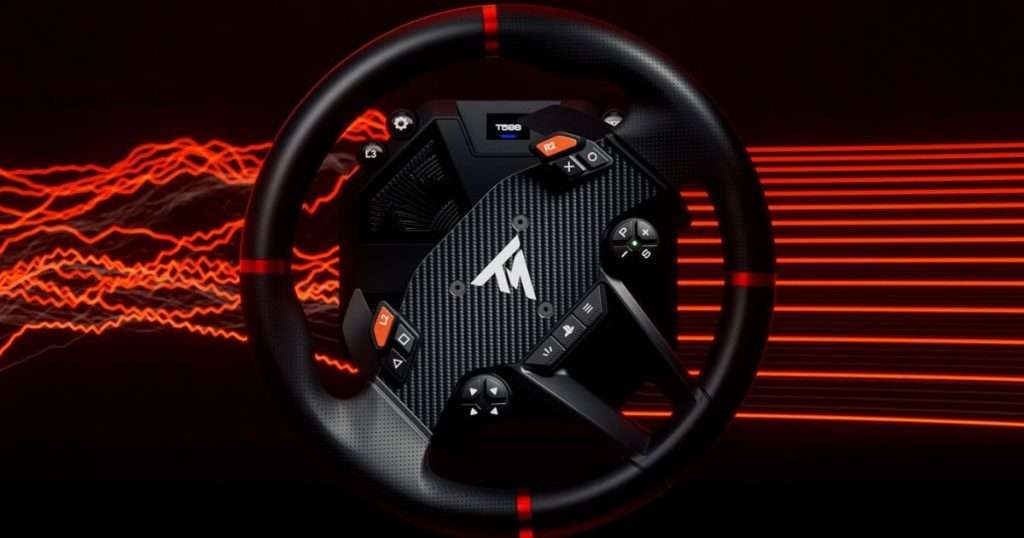
Image by Thrustmaster
So what exactly can go wrong?
- Mid-race disconnects
- Buzzing or inconsistent FFB
- Power supply issues
- Electromagnetic interference (EMI) from an ungrounded rig
If you have experienced any of these issues with your T598, consider one of the solutions outlined in this entry. Having issues with your equipment, rather than trying to break the code for that perfect lap time, is annoying, so getting these issues out of the way is a top priority. Let’s get started!
Update to the latest firmware
Your best first step will always be to ensure your equipment is running the latest firmware. Since updates are released frequently, it may be a user base-wide issue that the manufacturer quickly fixes.
Make sure you follow Thrustmaster’s instructions carefully, or you might get unwanted results.
Lower force feedback settings to reduce vibrations/wear on the wheel
Lowering force feedback can be another good way to alleviate disconnection issues with your T598. Using high force feedback can introduce additional vibrations that worsen weak points in the cabling or connectors, so try testing the wheelbase’s stability on a track of your choice until the disconnects stop.
Higher force feedback also puts more strain on the wheelbase, which can become critical in longer racing sessions, as seen in rally or endurance racing, where forces are almost constant. Heat levels will rise, and especially in warmer environments, the wheelbase might shut off due to overheating.
Replace the included data cable that comes with the wheelbase
In the context of loose connections, users have reported that replacing the included OEM USB-C data cable with a third-party USB-C-to-USB-C cable may fix the disconnection issue. A sturdier cable with a tighter fit can prevent brief signal dropouts, which may cause the wheel to lose FFB or temporarily drop its USB connection.
As quality issues appear to be present in the original cable, this is one of the most reliable fixes to get you back on track, with multiple users confirming that it solved the problem.

Ground your sim rig (where possible)
If you continue to experience disconnections despite the efforts mentioned above, it could indicate a larger issue with your setup, often caused by Electromagnetic Interference (EMI). Devices such as wheelbases, gaming headsets, VR headsets, webcams, and others emit electromagnetic waves that may disrupt USB cables. Grounding your sim rig might help prevent this.
Luckily, sim racing enthusiasts like Luis Blando have done extensive work on how to do this, which has become THE grounding guide for the sim racing community and is frequently mentioned in troubleshooting threads.
Although we won’t explore the guide in depth here, we’ll present initial steps to diagnose whether your issue is EMI-related and some simple fixes you can try before resorting to more extensive measures. EMI issues are more common in setups with high-power equipment such as motion platforms, belt tensioners, or powerful amplifiers, so if your rig includes these, the extent to which additional grounding measures are relevant will increase.
In the guide, Blando lists symptoms such as USB disconnects for no apparent reason, seemingly “connected” USB devices that aren’t working, and degraded signals, which can often appear as crackling in speakers or headphones. A good starting point for your grounding process is to use tools such as USBDeview, which lists all the USB connections Windows knows about, and lets you sort and inspect them easily. Furthermore, USBLogView will log all USB disconnects and reconnects, providing an overview of when a device went offline.
Before going all-in, as Blando mentions, it is good practice always to use shielded cables and ferrite cores, which can be attached to each end of USB cables. These are cheap and easy to get, so implementing this could be a good pre-step for the entire process, and it might just fix your issues before you go deep into trial-and-error troubleshooting. If necessary, aim to find an equivalent product available in your region.

If this does not solve your problems initially, it may be worthwhile to test the outlets you are using. This might include using a simple tester to confirm that your outlets are correctly wired. In the article, Blando presents a tester, but depending on your location, you might need to find an equivalent yourself.
After clearing that step, it is a good idea to establish a common ground for all the systems in your sim rig. Plugging everything into a single outlet is ideal, but if you must power your setup through two different wall outlets, you can connect the ground pins of your power strips using ‘ground-only’ dummy plugs. The entire process is explained in Blando’s article, so take a look if you take this approach.
Another step the guide also recommends is attaching a dedicated grounding cable directly from the sim rig’s metal to the outlet’s grounding point. Grounding the rig itself can help reduce static buildup, which can be another potential source of random disconnects.
Should none of these efforts yield any solutions, the guide goes into depth on installing EMI filters on power lines, using powered USB hubs and addressing motherboard-level USB issues, amongst other things. Blando describes all of the headaches of the process, so take note from their experiences.
When to Contact SimRigSupport
Sadly, issues with sim rigs aren’t always a ‘one size fits all’ situation. When you combine so many moving parts, including PC components and sim gear from numerous manufacturers, problems tend to arise.
If you have a problem that isn’t on any forum, that’s where we come in. SimRigSupport is a team of experienced, qualified professionals who believe there is no fault, no matter how big or small. We’re there for you, in person or online, using genuine parts and processes to give you the best sim racing experience possible. Our greatest priority is getting you back on track, so reach out to us as soon as possible!