For those of you who are unaware (or hiding behind a tree perhaps!), Assetto Corsa Rally launched earlier this month, with massive positive reception from the community.
Whilst the Force Feedback is still a prominent WIP – you can view our best wheel setttings here – Virtual Reality is the other element that people have been screaming out for. The game director confirmed earlier this month in an interview with Traxion “We will not support VR on day one with the early access on 13th November because we are still working on that,”
Does Assetto Corsa Rally have native VR Support?
Whilst the official support is some time away, we are pleased to say that the ever-ingenious Kunos playerbase has already found a solution for how you can (un)officially utilise your VR headset in game.
Overtake.gg have an excellent video that you can watch on their Youtube Channel – but if you prefer a written guide, then read on and we will look after you.

Quick Disclaimer: This is not an Official Method
As mentioned above, whilst Kunos are working on an official release, you should be aware that this is purely a workaround. You may, therefore, expect potential issues with optimisation, performance, or visual quality. The settings provided are general. Minor adjustments may be needed based on your VR headset brand and PC setup.
The Key Software for AC Rally VR: Unreal Engine VR Injector (UEVR)
UEVR (Unreal Engine VR Injector) is a powerful, free, and open-source tool that allows anyone to inject Virtual Reality (VR) capabilities into thousands of games that do not natively support VR. This includes Assetto Corsa Rally.
In short, it takes a standard “flatscreen” game and converts it into a full 6DOF (six degrees of freedom) VR experience, meaning you can look and move your head freely in the virtual 3D space.
You can download it here: https://github.com/praydog/UEVR
- Once Downloaded, ensure your VR headset’s native software (e.g., SteamVR) is running.
- Launch the uevr.exe

- Set the required Injection Settings for your VR Headset.
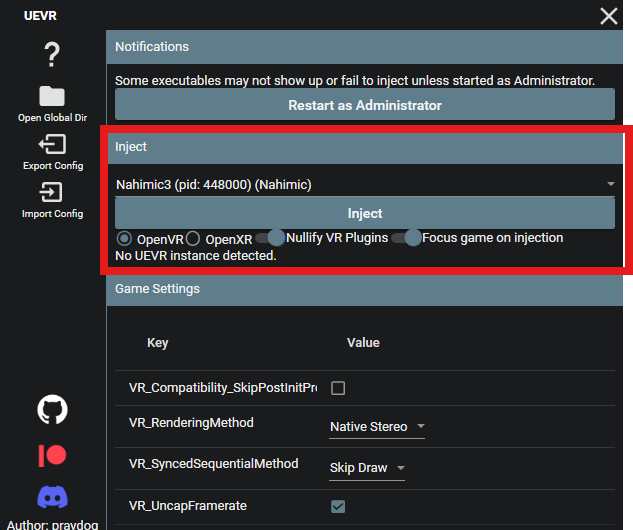
- Set these Further Settings:
- VR Competability = Unchecked
- VR rendering Mode = Native Stereo,
- Sequential Method = Skip Draw
- Vr Framerate = Checked
Credit to Traxion for the above screenshot
How to Find Assetto Corsa Rally on UEVR
Once you have your VR headset program running, follow the next steps to get Virtual Reality Racing.
- Launch Assetto Corsa Rally.
- Tab back into UEVR, and select the Assetto Corsa Rally Program from the Dropdown
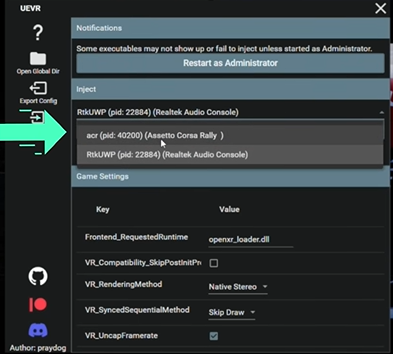
- Once the executable is done, select “Inject”

This will now allow you to use AC Rally in game.
(Credit to Overtake for the Screenshot)
So there you have it, that concludes our guide on setting up VR for Assetto Corsa Rally. We hope this workaround provides you with an immersive experience while we await the official native support from Kunos. Happy racing!