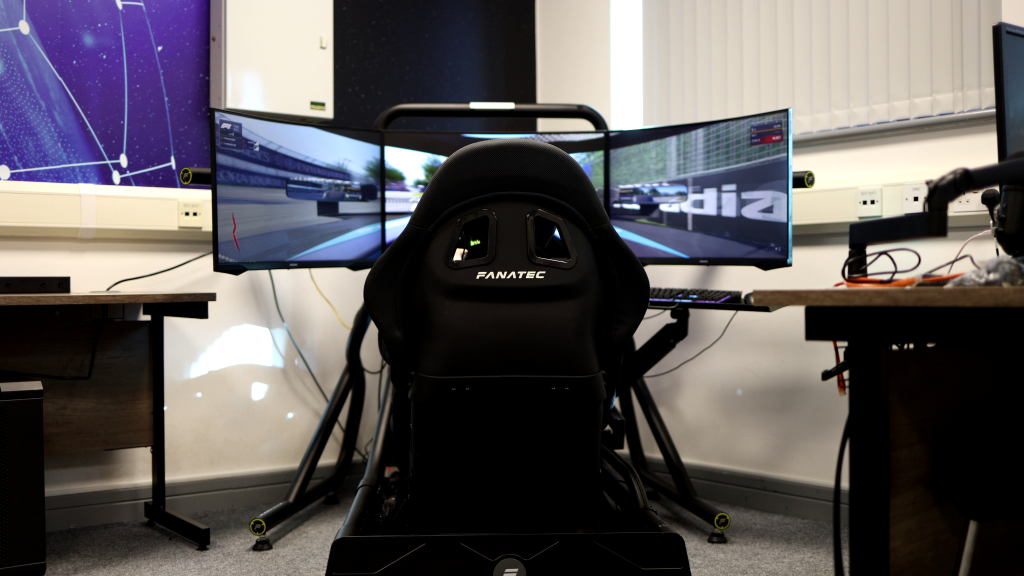
A heavily discounted racing wheel can look like a great Black Friday find until you realise the pedals cost extra. The wheelbase might also need a different stand, or turn out to be PC-only when you race on Xbox.
Sim racing gear has a few technical requirements that are easy to overlook, especially if you’re unfamiliar with the hardware. Even products from the same brand can have compatibility issues, and missing accessories can quickly eat into your savings.
Before comparing deals, note which PC or console you’ll be using and the exact models of any equipment you’re keeping. These four checks will help you catch common buying mistakes, whether you’re starting your first setup, upgrading, or shopping for someone else.
Key Takeaways
- Your existing setup may need extra support. Direct drive wheelbases can make lightweight desks and stands flex, while load-cell pedals need firm mounting. Bolt-hole patterns and desk clamp sizes also vary between models.
- Compatibility depends on your platform and equipment. A wheelbase that works on PC may be incompatible with Xbox or PlayStation. Mixing brands can require additional connections, and older quick-release systems or outdated Windows drivers can cause problems.
- A Black Friday discount may come with extra costs. Some listings include only the wheelbase, with the steering wheel, pedals, or mounting accessories sold separately. Compare prices, check what’s included, and be cautious with suspiciously cheap second-hand listings or requests for unprotected payments.
- Test equipment early and check return deadlines. Ask to see used gear working before you pay. For delivered purchases, inspect the contents and test the controls as soon as you can. Keep your receipts and packaging, especially if you’re buying ahead of Christmas.

Image Source: SimStaff
1. Buying Gear Your Desk or Rig Can’t Support
A wheelbase is the motor unit behind the steering wheel. Direct drive models can produce enough steering force to make lightweight desks and wheel stands flex or shake.
Before buying, check whether your stand supports the wheelbase’s weight and maximum torque (turning force measured in newton-metres, or Nm). If the manufacturer doesn’t list a supported model or torque rating, ask them directly.
You’ll also need to compare the mounting holes on the wheelbase and pedals with those on your stand or rig. Manufacturers such as MOZA publish diagrams with the measurements. If the holes don’t match, check whether a suitable adapter plate is available.
For desk setups, measure the tabletop thickness and the clearance underneath for a clamp. The MOZA R5 bundle clamp, for example, fits desktops up to 50 mm thick.
Pedals need attention too. Load-cell brakes measure how hard you press, and some need much firmer mounting than basic pedals. Heusinkveld’s Sprint pedals require a rigid rig with a solid connection between the pedals and seat.
Count spare USB ports and plug sockets, and leave room for the power supply and cables.

Image Source: SimStaff
2. Choosing Parts That Won’t Work Together
Check the manufacturer’s compatibility list for the exact model you’re buying, including support for your PC or console and the games you play.
With Fanatec, PlayStation compatibility comes from licensed wheelbases, while Xbox compatibility comes from licensed steering wheels. Products labelled “PS Ready” or “Xbox Ready” still need the appropriate licensed component.
On PC, you can mix pedal and wheelbase brands if the pedals support a separate USB connection and the game recognises both devices.
For example, basic Fanatec CSL Pedals need a ClubSport USB Adapter or CSL Pedals Load Cell Kit to connect directly to a PC. On consoles, supported Fanatec pedals must connect through the wheelbase.
Detachable steering wheels have another compatibility check: the quick release, which locks the steering wheel onto its base. Fanatec’s QR1 and QR2 systems don’t fit together, and some older models can’t be upgraded. Check which version you have before ordering.
For heavily discounted older PC equipment, find official drivers that support your Windows version. If the manufacturer has stopped updating the software and compatibility is uncertain, consider another option.
If you’re unsure about a particular combination, SimRigSupport has an instant technical chatbot that can help with compatibility questions.

Image Source: SimStaff
3. Paying for an Incomplete or Risky Deal
Start with the package contents. Product photos can show a complete racing setup even when the listing covers only one component.
The Fanatec CSL DD, for example, is a wheelbase sold separately from the steering wheel and pedals. The MOZA R5 bundle includes both, along with a desk clamp.
Read the contents list and confirm whether the power supply, cables, clamp, and necessary quick-release parts are included. Add any missing accessories and delivery charges to the advertised price.
It’s worth checking the price history, too. In a 2025 investigation, Which? found that 83% of the 175 general retail products it examined had been available for the same price or less outside the Black Friday sales period. Compare the exact model across retailers and look at what it cost before the discount.
For unfamiliar hardware brands, check that official drivers, replacement parts, and manufacturer support are available. Look for applicable safety and conformity documentation, including CE or UKCA information for UK purchases and FCC compliance information where required for US electronics.
Second-hand listings need extra care. Be wary of prices far below comparable used equipment. For a local sale, walk away if the seller refuses inspection or collection, or pressures you for a deposit before viewing.
Ask for a short phone video showing the equipment powered on beside a handwritten note with your name and the current date. It can help establish that the seller has the item, although you’ll still need to test it. Request the original invoice and check with the manufacturer whether any remaining warranty can transfer to you.
For shipped purchases, use the marketplace’s protected checkout where available. Avoid cryptocurrency, direct bank transfers to unknown sellers, and PayPal Friends & Family, which isn’t covered by PayPal Buyer Protection.
For local collection, pay only after inspecting and testing the equipment. Cash leaves you without payment-provider protection, and PayPal’s UK Buyer Protection generally excludes “Item Not Received” claims for collected goods, apart from qualifying in-person QR-code payments.
Check the retailer’s return deadline as well. If you’re buying a Christmas gift, make sure the holiday return window extends beyond December 25, and find out whether opening or testing the equipment affects change-of-mind returns.

Image Source: SimStaff
4. Buying Gear Without Properly Testing It
For second-hand equipment, insist on seeing it work before paying. Buying a direct drive wheelbase or load-cell pedals blindly in a car park leaves you with little chance of discovering faults beforehand.
Arrange a demonstration with the equipment securely mounted and connected to a PC running the manufacturer’s software, where supported. You’ll be able to check whether the steering and pedal inputs respond properly.
For delivered equipment, open the box as soon as it arrives, even if it’s intended as a gift. Check for shipping damage or missing parts, and keep the original packaging, foam inserts, receipts, and order confirmation.
Once everything is securely installed according to the manufacturer’s instructions, spend about 10 minutes on these initial checks:
- Connections: Confirm that Windows and the manufacturer’s software recognise the equipment. For console purchases, check that the console and intended game recognise it.
- Steering and pedals: Follow the calibration instructions, turn the wheel and press each pedal. Check that the readings respond smoothly and the pedal readings return to zero when released.
- Other controls: Test every button, paddle shifter, and any separate shifter included in the purchase.
- Force feedback: With the wheelbase securely mounted, test the steering forces at a low setting in a compatible game.
A short test can reveal obvious faults, though it can’t guarantee the equipment is in perfect condition.
If you find a problem, record a short video and contact the seller promptly, before the relevant return or claim deadline passes.
A Final Check Before You Buy
If you’re choosing between two Black Friday deals, pay attention to the support available after purchase. Clear setup instructions, replacement parts, and an accessible manufacturer can save you trouble if something goes wrong later.
And if you’re unsure whether a particular upgrade will fit or work with your current equipment, SimStaff offers free consultations to help you review your setup and choose compatible gear.
Bring the product listing, your platform, and the model names of anything you’re keeping. If you’re buying for someone else, a photo of their existing setup can help.